A brief explanation of the tool 📖
With hello again's communication feature, you can flexibly get in touch with registered customers. The options available depend on which contact details your customers have verified, such as their email address, phone number, or device by installing the loyalty club app.
Where can I find the campaigns in the dashboard?
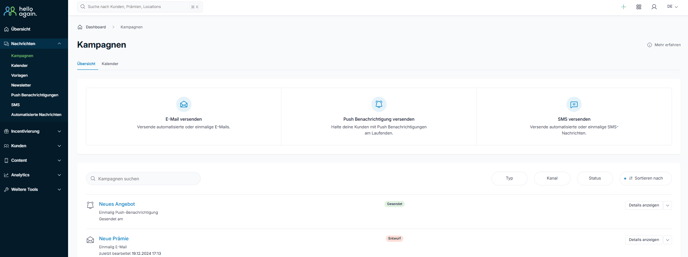
You can find the campaigns in the left sidebar under Messages -> Campaign.
What types of shipping media are there?
There are three different media that can be used to run campaigns:
> Email ( newsletter)
> Push notification (via smartphone app)
> SMS (extra package)
The following four main steps are required to communicate with customers about a campaign:
- Choice of medium (e.g., email, push notification, SMS)
- Optional for automated messages: Triggers
- Content of the message
- Target audience (individual contacts or by segments)
Automated (event-triggered) and one-time campaigns (such as email newsletters) can be created.
Create an automated campaign | e.g., a birthday greeting
Create a one-time campaign | e.g., for a new product in the range
Automated campaigns
You can send automated messages to your contacts based on certain triggers. These could be, for example:
- Birthday: On the day of the birthday or the first day of the month of the birthday.
- Purchase made:The campaign is triggered when a contact has made a purchase and this is reported to hello again (API). The message is sent to those contacts who triggered the trigger.
- Point change: The campaign is triggered when a point change occurs and sent to all contacts whose point account has been changed.
- Manual booking:The campaign is triggered by a manual points booking and sent to those contacts for whom a manual points booking has been made.
- Reward redeemed: The campaign is activated by a reward redemption and sent to those contacts who have redeemed this reward.
- Participated in the contest:When a contest ends, thecampaign is sent to those contacts who participated in a contest in the app.
- Check-in:The message is triggered by a check-in in the app and sent to those contacts who have checked in at a location.
- Coupon redeemed:The campaign is triggered by a coupon redemption and sent to those contacts who activated this coupon.
- Inactivity:The campaign is triggered by a defined number of days of inactivity by a contact.
- Registration:The campaign is triggered by registering a contact.
- An option can be set to move the trigger by X days before/after the original day.
- Points expiration: Thecampaign is triggered X days before a contact's points expire.
Templates and copies
- You can create your own campaign templates or preselect a campaign template created by hello again.
- Templates exist for each medium and define a trigger (for automatic campaigns), content, and a recipient group, which can then be modified during the creation of a campaign.
- Templates can be created, edited, and deleted.
- A template can be created from an existing campaign.
- Similarly, campaigns that have already been created can be copied so that the settings and content can be reused in a new campaign.
Push notifications | How it works
Send newsletter | It's easy
Automated campaigns | Always at the right time
Segmentation | Targeted communication