🔹 Kund:innen verwalten
In der Benutzerverwaltung kannst du Kundendetails einsehen, filtern und gezielt Aktionen ausführen.
Hier erfährst du mehr dazu:
➡️ Benutzerverwaltung: Kundenübersicht & Details
🔹 Segmente nutzen
Mithilfe von Segmenten kannst du Gruppen mit ähnlichen Interessen oder Verhaltensweisen definieren – z. B. „Top-Kund:innen“, „Neukund:innen“ oder „Geburtstagskinder“. Dadurch kannst du Kampagnen noch zielgerichteter ausspielen.
Mehr Infos dazu findest du hier:
➡️ Segmente anlegen & verwalten
➡️ Segmente 2.0 – Erweiterte Funktionen
🔹 Kundendetails verstehen
Jede:r Nutzer:in hat eine eigene Profilansicht mit relevanten Daten wie Punktestand, Transaktionen oder letzten Aktivitäten. Diese Daten helfen dir, individuelle Anreize und personalisierte Angebote zu setzen.
➡️ Kundendetails aufrufen & verstehen
📌 Was du in der Kundenübersicht siehst
In der Kundenübersicht findest du alle in deiner App registrierten Benutzer:innen. Mit dem Benutzer-Filter kannst du gezielt nach bestimmten Kontakten suchen und individuelle Nutzerprofile aufrufen.
🔍 What the contact list offers you:
- An overview of important demographic data
- Export, import, and invitation tools for contacts
- Segmente erstellen oder einsehen
- neue Kund:innen einladen oder importieren
👁 Details zu einem Kontakt:
Ein Klick auf das blaue Auge öffnet die Kundendetails, wo du weitere Informationen findest:
- Registrierungsdaten, Punktestand, zugewiesene Segmente und letzte Aktivität
- Live feed & activities to analyze your customers' behavior
- Message history with all sent messages
- Technische Details zu Endgeräten & Privacy-Log & Einwilligungen
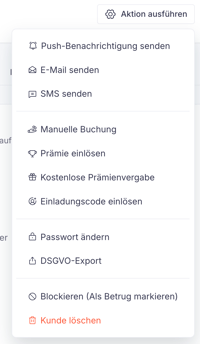
⚡ Direkte Aktionen ausführen:
Unter "Aktion ausführen" kannst du:
✅ Punkte manuell auf- oder abbuchen
✅ Eine Push-Nachricht/Mail/ SMS senden
✅ Eine Prämie für den Kontakt einlösen
✅ Einen Einladungs-Code einlösen (Freunde Einlade Code)
✅ Den Kontakt endgültig löschen oder bearbeiten
✅ Passwort ändern
✅ Blockieren oder als Betrug markieren