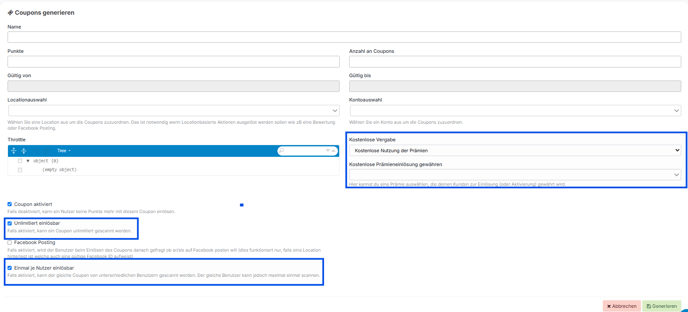
You can find out how to set this up via the dashboard in the following article.
1. Create premium
To create a reward, go to Intensification, then Rewards, and click on the 'Create reward' button.

In order for a reward to be redeemed free of charge via a coupon, you must set it up accordingly.
-
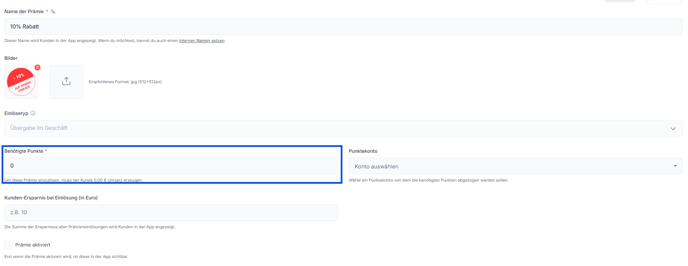
Create a new reward and set the required points to 0 points.
-
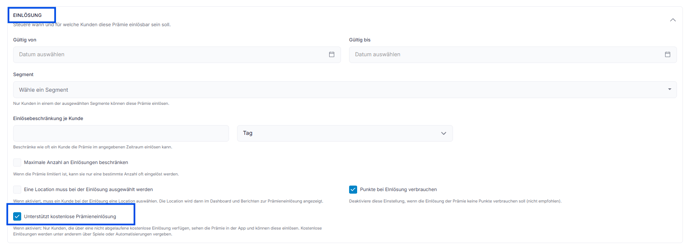
Go to Advanced Settings and enable the option "Support free reward redemption" under Redemption.
-
Save the changes and activate the bonus.
2. Create coupon
To create a coupon, go to Incentives in the dashboard, then click on Coupons.
On the corresponding page, you will then see the Generate Coupon button.

Now you can create the coupon that allows you to use the reward free of charge.
-
Create a new coupon.
-
If necessary, you can activate the following options:
-
"Unlimited redemption" if the coupon can be used an unlimited number of times.
-
"Redeemable once per user" if each customer is only allowed to use the coupon once.
-
-
Select the option "Free use of the bonus" from the "Free allocation" drop-down menu .
-
Select the previously created bonus.
-
Save the coupon.