🛠 Creating a survey: Step by step
1️⃣ Navigation
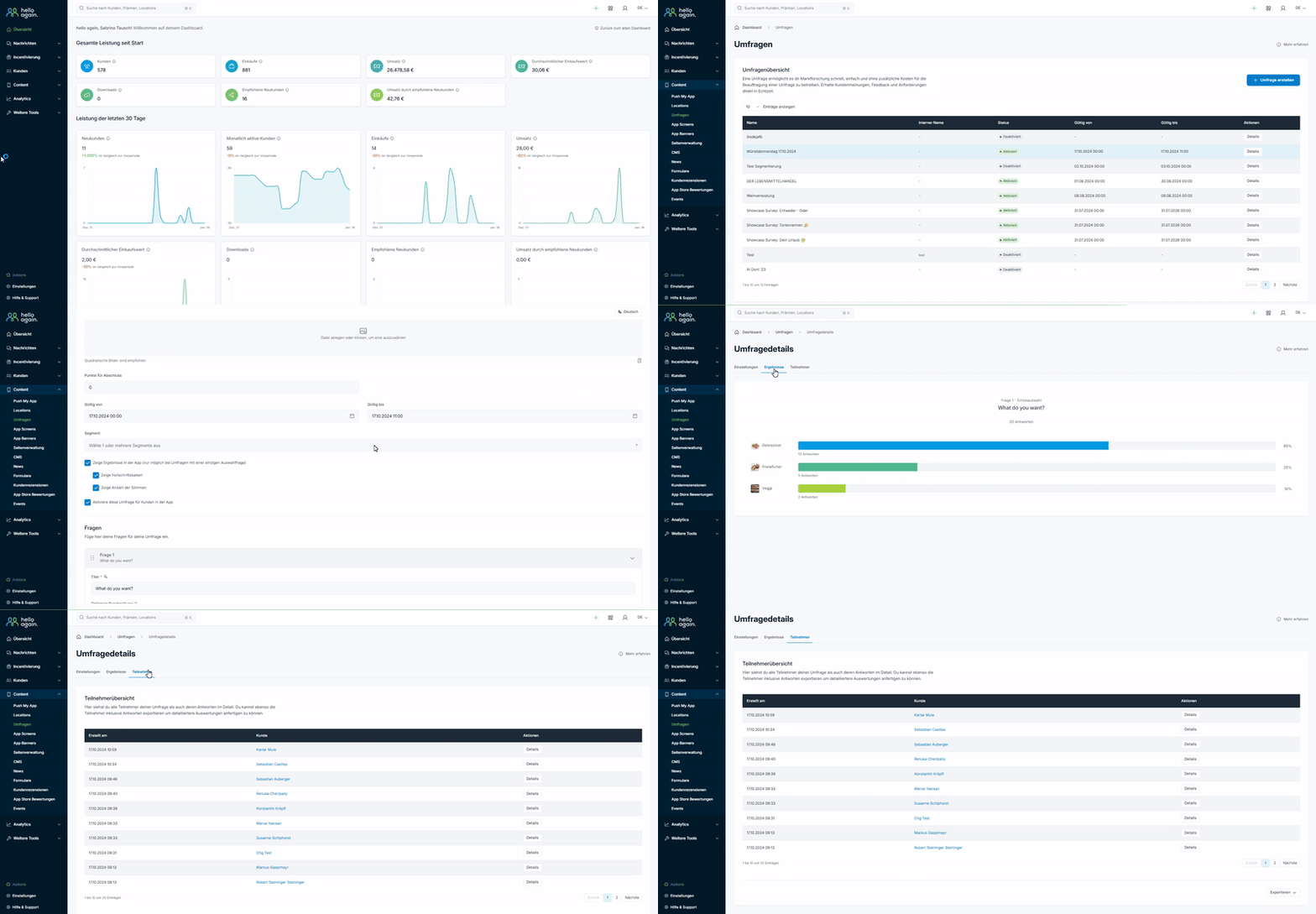
In the dashboard, go to Content → Surveys and click on "Create new survey."
2️⃣ Define basic information
- Title: Give the survey a meaningful name.
- Description: Write a brief introduction to explain the purpose of the survey to your customers.
3️⃣ Add questions
- Choose from different question types such as multiple choice, rating scales, or open-ended questions.
- You can also make questions mandatory fields to ensure that they are answered.
4️⃣ Select target group
- Determine whether the survey will be sent to all customers or only to a specific segment.
5️⃣ Set visibility and duration
- Define when the survey will be visible and how long it should be available.
6️⃣ Customize design
- Upload a suitable preview image to make the survey more visually appealing.
7️⃣ Save and publish
- Review all the information and click "Publish" to make the survey live.
📊 Evaluate results
- Live view of responses: Track how your customers respond to the survey in real time.
- Detailed statistics: Download the results as a CSV file and analyze the data to identify trends and patterns.
- Use feedback for improvements: Use the insights to further develop your offering and take targeted measures.
💡 Tips for successful surveys
- Clear and concise: Keep the survey short to increase participation rates.
- Offer rewards: Motivate your customers with small incentives, such as extra points or discounts.
- Ask specific questions: Align the survey with a clear objective, such as product improvements or service feedback.
Here are some examples of surveys you could start:
1️⃣ Customer satisfaction
- Ask your customers how satisfied they are with your product, service, or app.
- Example: "How would you rate our service on a scale of 1 to 5?"
2️⃣ Product review
- Collect feedback on specific products or services.
- Example: "What did you like about [product name]? What can we improve?"
3️⃣ Preferences and requests
- Find out what your customers want to see in the future.
- Example: "What new features or products would you like to see?"
4️⃣ Event feedback
- Get feedback on an event you organized.
- Example: "How would you rate our event? What could we do better next time?"
5️⃣ Bonus preferences
- Ask which rewards your customers prefer.
- Example: "What reward would motivate you most to collect points?"
6️⃣ Marketing campaigns
- Test new advertising ideas or campaigns.
- Example: "What kind of offers appeal to you most (discounts, free products, etc.)?"
7️⃣ Demographic data
- Get to know your target audience better.
- Example: "How old are you?" or "What is your preferred shopping channel?"
8️⃣ User-friendliness of the app
- Find out how easily and intuitively your customers can find your app.
- Example: "Did you have any trouble navigating the app? If so, what kind?"
9️⃣ Seasonal themes
- Take advantage of special occasions such as Christmas, Easter, or summer.
- Example: "What summer promotions or offers would you like to see?"
0️⃣ Testing new products or features
- Conduct surveys before a product launch to get feedback.
- Example: "Would you use [new product/feature]? Why or why not?"

