Google Developer Account:
- Log in to your account at https://play.google.com/console/u/1/developers/ using your Google Developer Account credentials.
- Go to "Users and Permissions" in the menu on the left. Then, for the user "helloagainapps@gmail.comClick the "Manage" button.
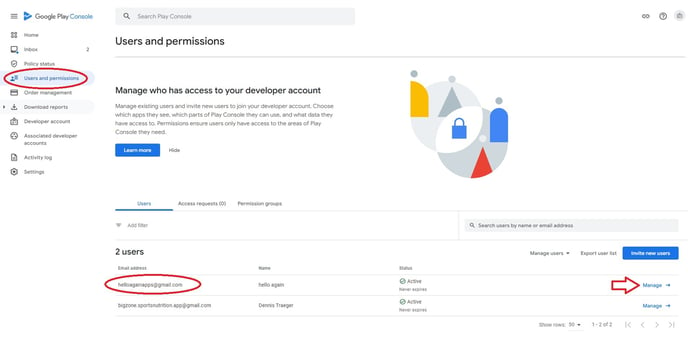
- Finally, click "Remove User." Confirm once more with "Remove," and you're done!

Apple Developer Account:
1. Log in to your account at https://developer.apple.com/account using your Apple Developer Account credentials.
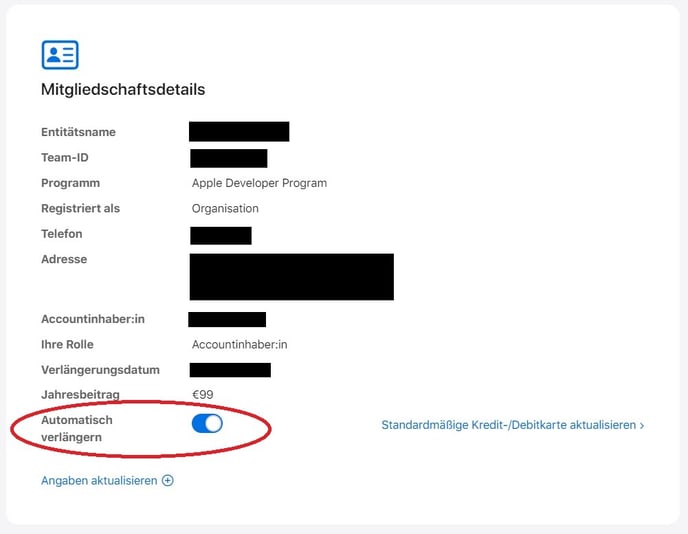
2. Scroll down until you reach "Membership Details." It is very important to ensure that automatic renewal is disabled . Otherwise, your membership will be automatically renewed each year and €99 will be charged.
No further steps are necessary.