Segments - Advanced Settings
This article shows you how you can use additional settings to customize segments even more precisely in order to optimally address your target groups.
📌 General information about segmentation can be found here: Segments overview
Advanced settings:
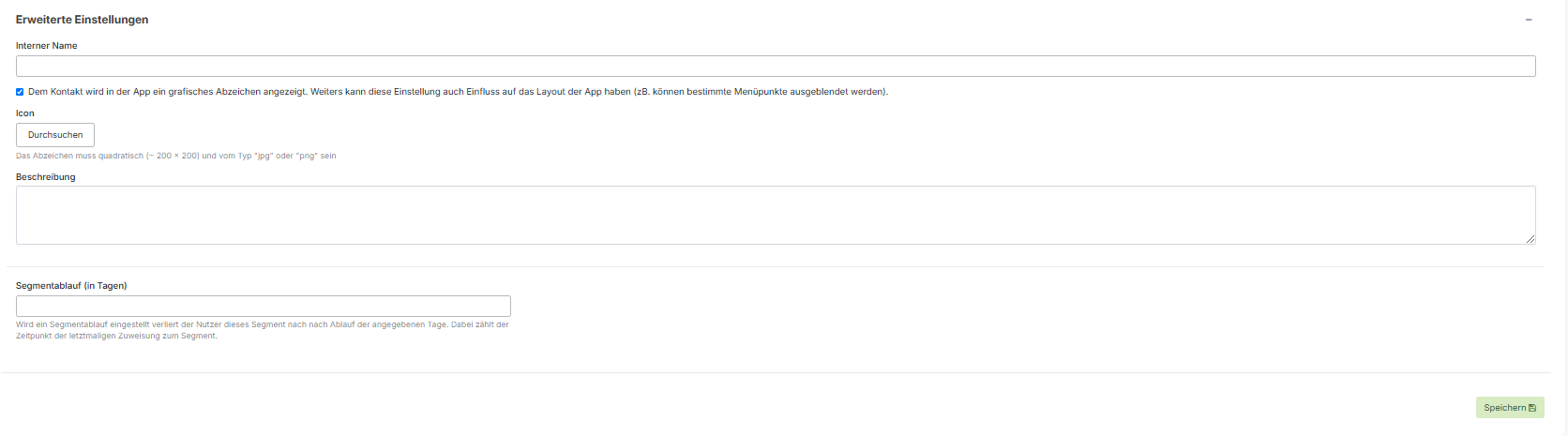
If you open the content under "Advanced," you will have additional options:

Option to add an internal nameso that segments can be easily found
Icon:
This will be displayed next to the profile picture as a badge (circle, use PNG).
Description:
If necessary, a detailed description can be added to the segment.
Shoutem ID:
This value is only relevant for hello again administrators and should not be changed.
Segment sequence:
If you want to set a time limit for your segment (promotional period), you can do so here.
Video on segments: