Step-by-step guide
-
Open the new "Gamification" section in the dashboard.
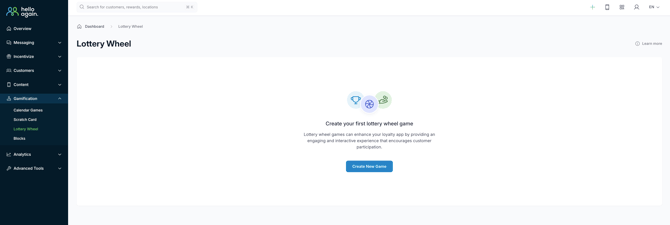
-
Create your game using the "Create Lottery Wheel" button
> The page will then reload and you will be taken to the game's editing page.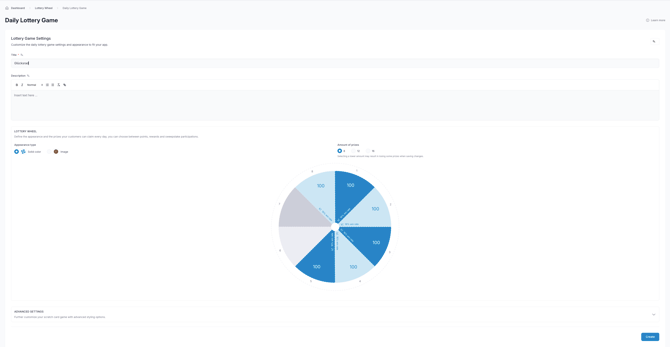
-
If bonuses and competitions are offered , these must first be configured. Points can be awarded directly on the wheel of fortune in this interface.
-
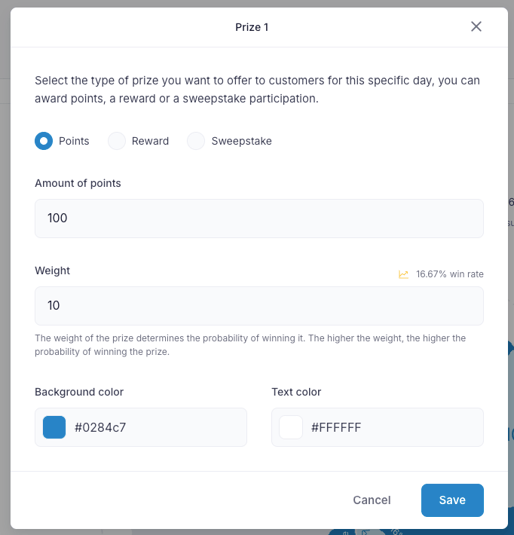
Click on one of the fields to see the prize and also the Adjust profit type and then save it
Frequently Asked Questions
How long does the wheel of fortune run?
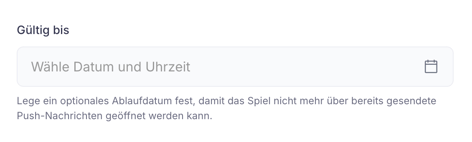
→ The wheel of fortune is controlled via the banner and can therefore be played individually at any time, and the duration can also be determined.
Wichtig: Wenn du das Glücksrad mit einer Push-Nachricht bewirbst und es nicht unendlich spielbar sein soll, stelle bitte dennoch ein Enddatum ein. Nach diesem Datum kann man das Glücksrad nicht mehr drehen.
Can limited rewards be given away as prizes?
→ No. This is because earlier users can already use up the entire quota of prizes, without giving later users a chance to win. In this case, we would recommend competitions, as a clear number of winners can be drawn.
Please note that you must activate the setting that allows multiple entries:
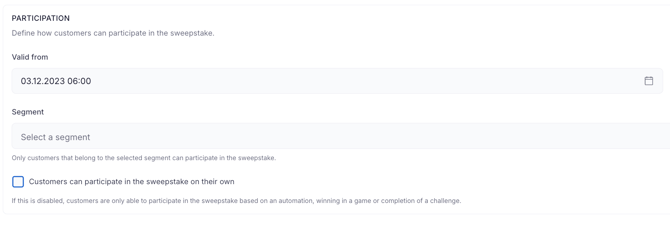 Here, the check mark is next to "Customers can participate in the sweepstake on their own." deselect.
Basic information:
Daily lottery with your customers
-
Playable once a day, not weekly, monthly, etc.
- 8, 12, or 16 fields as an option Possible
- The wheel of fortune is controlled via the app banner.
-
Switching on/off via date or segment
-
The wheel of fortune is linked to a shortcut that links to this specific screen.
-
- Won bonuses appear in the bonus list
- No limited bonuses should be awarded (e.g., 3 pieces, 20 pieces, 100 pieces)
-
Even if the probability of winning is very low, the prize can quickly be snapped up, resulting in the user winning the reward but not being able to redeem it.
-
Thewheel of fortune has 100%and theprobability of winningisdistributed*
*How it works:Imagine the game as a cake divided into pieces of different sizes. Each piece represents a win with a certain probability. (The individual wins)
*Daily chance to win:The odds of winning apply to each daily game. Every day, you receive the same cake with the same pieces and have the chance to win a larger or smaller piece.
This means that if I have 8 segments, I have to distribute them across 100%. Accordingly, I assign the lowest probability to the rarest win.
The rarest win should therefore be less than 5%, while the most frequent can occur significantly more often at 10-20%.
Bonuses & Sweepstakes Requirements and correct settings:
|
Setting |
Why |
|---|---|
|
Optional: Set valid from - to |
To ensure that the premium can only be redeemed during the desired period |
|
Obligation: Activate free premium redemption (for premium) |
This means that the bonus will not be displayed in the list until it is won and will only be unlocked by the promotion. |