To ensure the fairness and integrity of your loyalty program, it is very important to us to prevent potential abuse.
Our fraud detection system is an intelligent system designed specifically for this purpose: it identifies and prevents unusual or potentially fraudulent activities that aim to exploit your loyalty program (e.g., redeeming welcome bonuses multiple times, scanning other customers' invoices, etc.).
💡 Key features of fraud detection
1. Fraud detection based on user behavior ⚠️
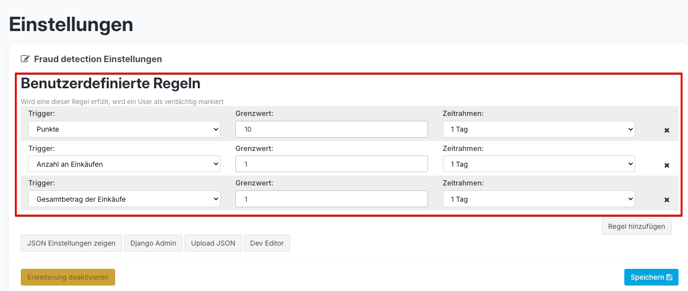
- Here's how it works: By activating fraud detection in the dashboard, you can set rules to identify suspicious activities or customers. The following settings are available:
- Maximum number of points in period X
- Maximum number of purchases in period X
- Maximum total amount of all purchases during period X
To set these rules, navigate to Settings in the dashboard > scroll down to "Fraud Detection" > set your desired values/rules.
Please note: Fraud Detection must first be activated by hello again!
In this case, please contact us by email: support@helloagain.com
2. Verified Login ✅
- How it works: This feature ensures that logins to your app can only be made from devices that our system has classified as known and trustworthy. If someone attempts to log in from an unverified source, a one-time password (OTP) is requested via email for security purposes. This ensures that only the legitimate user is granted access.
3. One registration per smartphone (One Signup per Smartphone) 📱
- How it works: This intelligent feature helps you keep an eye on whether attempts are being made to register with multiple different user accounts using the same smartphone .
Such multiple registrations are often an early warning sign of potentially fraudulent activity or misuse of your loyalty program.
The "One Signup per Smartphone" feature is designed to prevent users from redeeming the welcome bonus or Friend Invites Bonus multiple times.
- Your advantage: You will receive a notification in the dashboard as soon as such activity is detected. This allows you to identify these suspicious profiles early on and take effective action against abuse. Depending on your settings, you have two options for responding:
-
Notification and manual review: A notification about the suspicious profile appears in the dashboard. You can then review the profile yourself at your leisure and block it manually if necessary. Here, the user is informed that further registration via the same smartphone may result in the account being blocked.
-
Automatic blocking: The system can also automatically block the suspicious profile as soon as the rule is triggered.
-
You can see what this warning looks like in the app below.
Please note: If a user accidentally enters an incorrect email address, they will still receive the warning.
We recommend only using this feature when a clear pattern of fraudulent behavior is evident in the app.
4. Reports of fraudulent activity via email (fraud report emails) ✉️
During setup, you have the option to set up regular reports on suspicious activities or customers.
Your advantage: You stay proactively and conveniently up to date. This allows you to respond quickly and specifically to potential fraud cases without having to constantly check the dashboard.
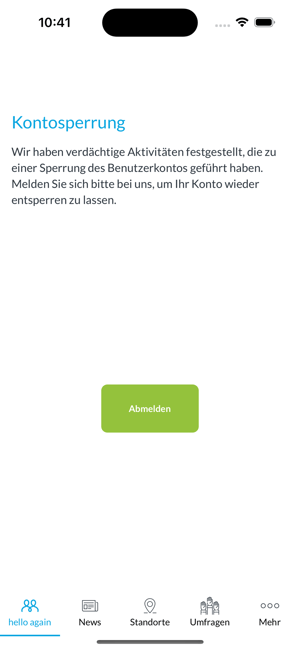
📳 What users see when fraud is suspected (Fraud Screen):
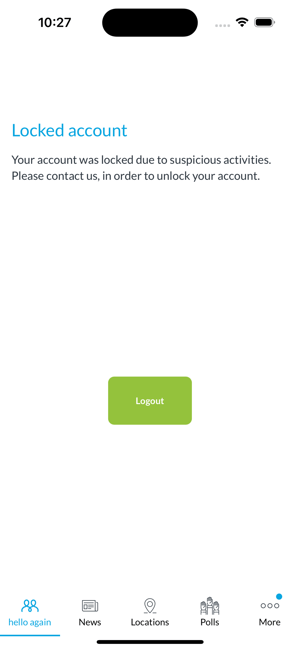
Transparency is important to us: if a user is flagged as suspicious by Fraud Detection, he or she will see a special notification screen in the app.
This screen informs the user about the situation in an understandable way (e.g., unusual security activity) and, if necessary, provides instructions for the next steps (e.g., logging in again or contacting support). The text on this information screen can, of course, be customized to suit your individual communication needs.
Images/screenshots:
Working with Fraud Detection 👩💻
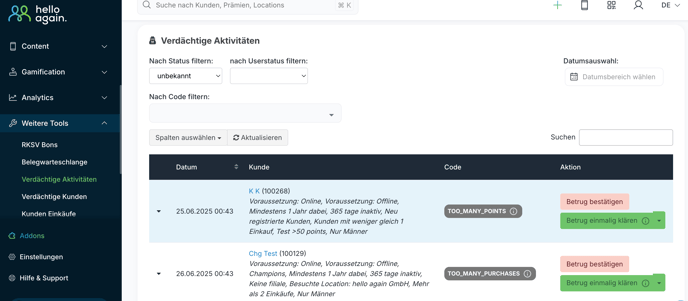
🔍 Where can I see suspicious activities/customers in the DB?
Navigate to the menu item "Additional Tools" > select either "Suspicious Activities" or "Suspicious Customers" > here you will find a list of suspicious "Activities" or "Customers" > you can now choose whether you want to "confirm" the fraud or clarify it "once" or "permanently."
🚨 Where can I unblock customers or manually mark them as fraudulent?
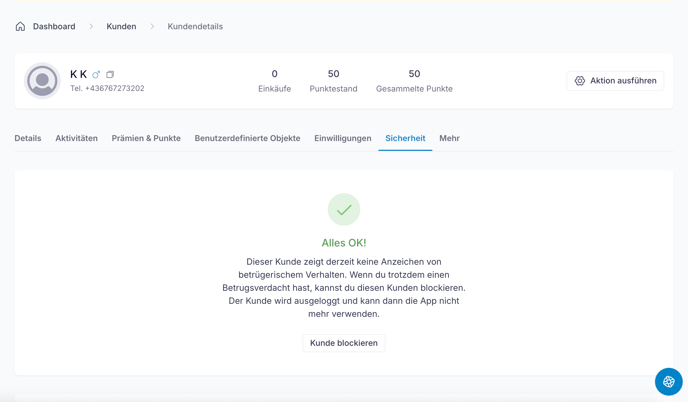
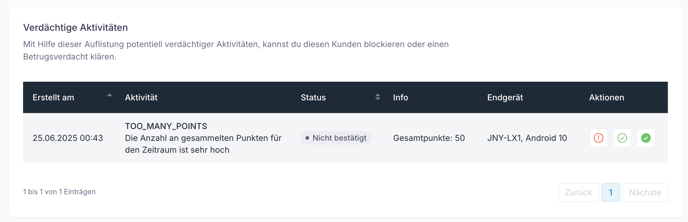
Go to the respective user > select "Security" > here you will see the message "Everything is OK!" if there is currently nothing suspicious > scroll down to "Suspicious Activity" > here you can see what type of fraud has been detected > under "Actions" you can "confirm" the fraud, "clear it once" or "clear it permanently."