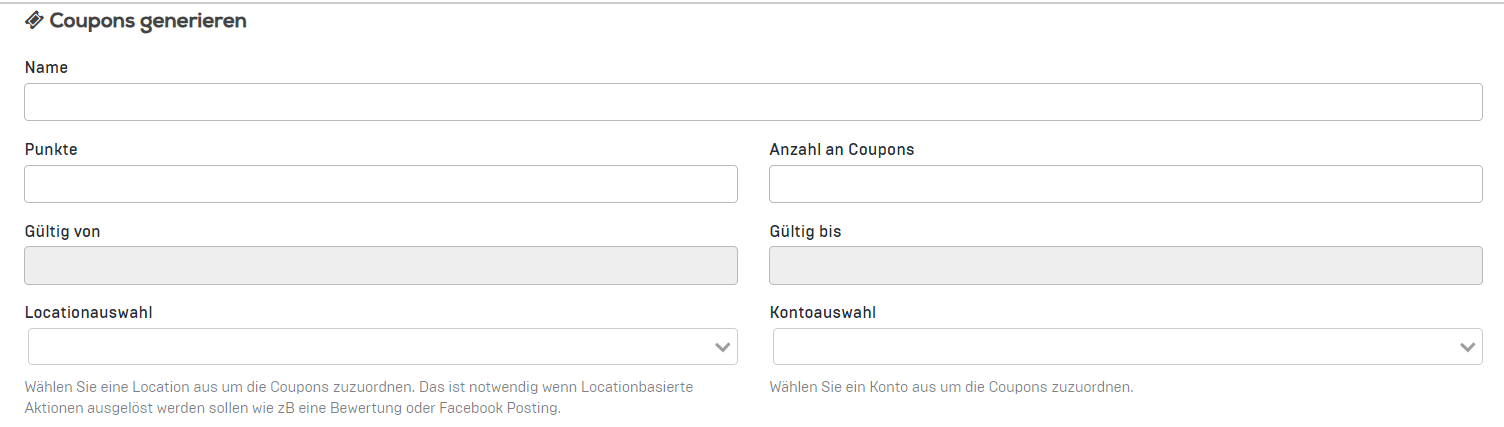
In the dashboard, go to "Coupons" and then select "Generate coupon."
-
Enter the name of the coupon.
-
Specify how many points should be loaded onto the QR code.
-
Determine the desired number of coupons to be generated.
-
You can also set the validity period of the reward and select a location to which the coupon should be assigned.
- If you have a stamp card in the app, you can add an account to the coupon.
-
You can choose between "unlimited redemption" and "one redemption per user." If none of the three boxes are selected, the code will be generated so that it is invalidated after a single scan (recommended for loyalty cards).
- You can also set the coupon to trigger a Facebook post. In this case, when redeeming the coupon, the customer will be asked if they want to post a check-in. Please note, however, that this only works if a location has been added to the coupon.
To generate the QR code on a PDF card, follow these steps:
-
After you have entered the key data, click on "Generate."
-
Go to the coupon details and scroll down to 'Generate PDF card'.
-
Select a background image on which the QR code should be displayed.
- Click on "Generate PDF cards."

5. A green box will appear where you can download the PDF file.
