Added value of the wheel of fortune
The wheel of fortune is a cost-effective and entertaining way to increase engagement in your app. The app banner is an important component that offers many additional benefits.
- Affordable alternative to the Games Package: The Wheel of Fortune offers you a cost-effective solution that provides similar benefits to the more comprehensive Games Package .
- Daily engagement: Users can spin the wheel of fortune every day, which promotes engagement and interaction with the app and strengthens customer loyalty.
- Brand anchoring: Daily participation keeps your brand in the minds of customers and ensures stronger brand loyalty.
- Customizable: You can set up your own wheel of fortune in the dashboard. More on this further down in the article.
- Included app banner: With the wheel of fortune, you also receive an app banner that directs your customers to the wheel of fortune. In addition to promoting the wheel of fortune, you can also use the app banner for many other campaigns.
- Promote current promotions: Spark your users' interest in current promotions or products.
- Advertise WKZ (advertising subsidies) and other offers: Promote special offers or discounts directly in the banner.
Here are a few examples of how the wheel of fortune could look in your app!
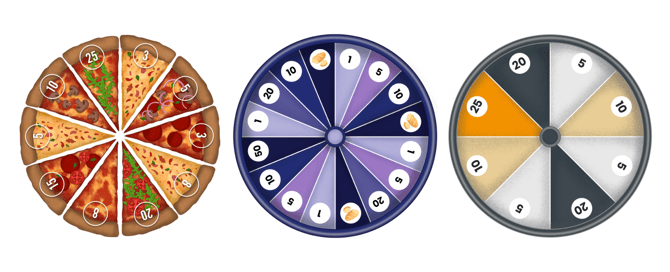
How does the wheel of fortune work?
The Wheel of Fortune is an interactive lottery game that allows your customers to win rewards and points every day. It can only be played once per day, and there are no integrated competitions —only rewards and points can be won. It provides fun and motivation and encourages daily interaction with your app.
Profit distribution:
The wheel of fortune is divided into 8, 12, or 16 segments, each of which represents a prize. The probability of winning is distributed evenly across the segments, with rarer prizes having a lower probability.
Visibility and control:
The wheel of fortune is displayed above the app banner. Here you can decide whether the banner is displayed and for how long or for which customer groups:
- Link: The banner takes users directly to the wheel of fortune, allowing them to participate quickly and easily.
- Segmentation: The banner can be activated for specific customer groups, e.g., loyal customers or for special promotions.
App banner settings
The app banner is a powerful tool that not only promotes the wheel of fortune, but can also be used for other marketing activities in the app:
- Enable/disable banner: You can specify whether and when the banner should be visible.
- Links: The banner can lead directly to important promotions, offers, or the wheel of fortune.
- Control by date or segment: Adjust the visibility of the banner to specific time periods or target groups.
Here you can find more information about the app banner.
How can you configure the wheel of fortune according to your wishes?
The technical implementation of the wheel of fortune is initially carried out by our team. As soon as the wheel of fortune has been set up and activated in the dashboard, we will inform you. You then have a wide range of options for configuring the wheel of fortune according to your wishes. In the dashboard, you can access the menu item "Gamification -> Wheel of FortuneBack to overview.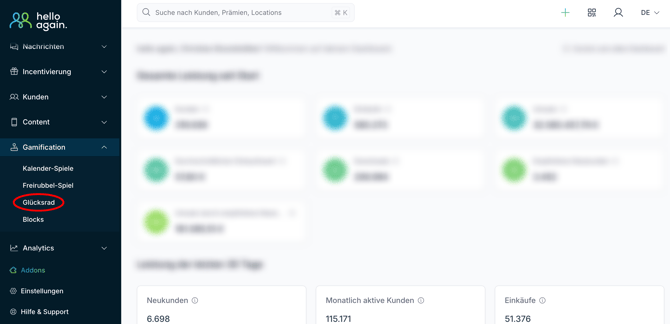
Click on "details" to access the settings area for your wheel of fortune. There you will find various customization options:
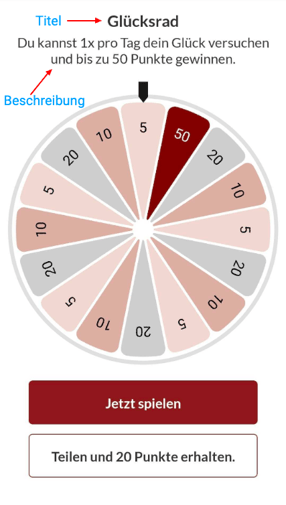
- Title: The title displayed at the top of the Wheel of Fortune page.
- Description: The description that follows immediately after the title. Here, it is a good idea to insert a motivating text such as "You can try your luck once a day and win up to X points!"
- appearance:
- Single color: If this appearance is selected, you can customize the colors of the wheel of fortune and its fields according to your preferences. Simply click on the fields in the wheel of fortune preview and enter the hex code for the color.
- Image: Here you can upload a fully designed image instead of coloring in all the fields manually one by one.
- Number of prizesHere you can decide how many prizes your wheel of fortune should contain. You can choose between 8, 12, or 16 Select prices.

- Price and color settings (if the single-color appearance has been selected):
Now you can click on the first field of your wheel of fortune, after which a separate window will open where you can edit the specific field. The following settings are available here: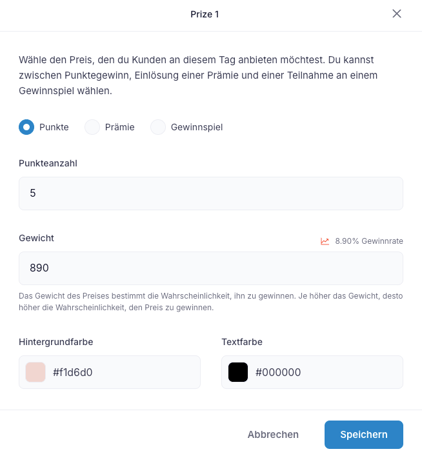
- Type of profit: Bonus, points, or contest.
- Select number of points, select bonus, or select competition:
Depending on the type of prize you have selected, you can either specify the number of points to be awarded here or link to the reward or competition.
- Weight:
The weight indicates the probability of winning the specific field. The higher the weight, the more likely it is to win the prize. Therefore, the probability of winning all prizes should always add up to 100% in the end.
ATTENTION:
1.) It is important to note that our system always calculates the probability of winning in relation to the existing prices. So please don't be confused if our display in the dashboard does not initially match your weighting.
Simply enter your weightings one after the other for all prices, and as soon as they are set for all of them, the weighting of the first price will also be displayed correctly.
2.) A Comma placement is not currently possible here. in the setting, so the weighting for 8.9% as 890 be entered. For 12% would then be 1200, for example.
- Background color: This determines the background color of the field.
- Text color: This determines the text color of the field.